Flutter POS: an offline-first app that started as a technical test
My open source Flutter POS began as a technical test for a job. How offline-first apps are usually built, which of those methods Flutter POS uses, how its sync works, and the bugs people found after I published it.
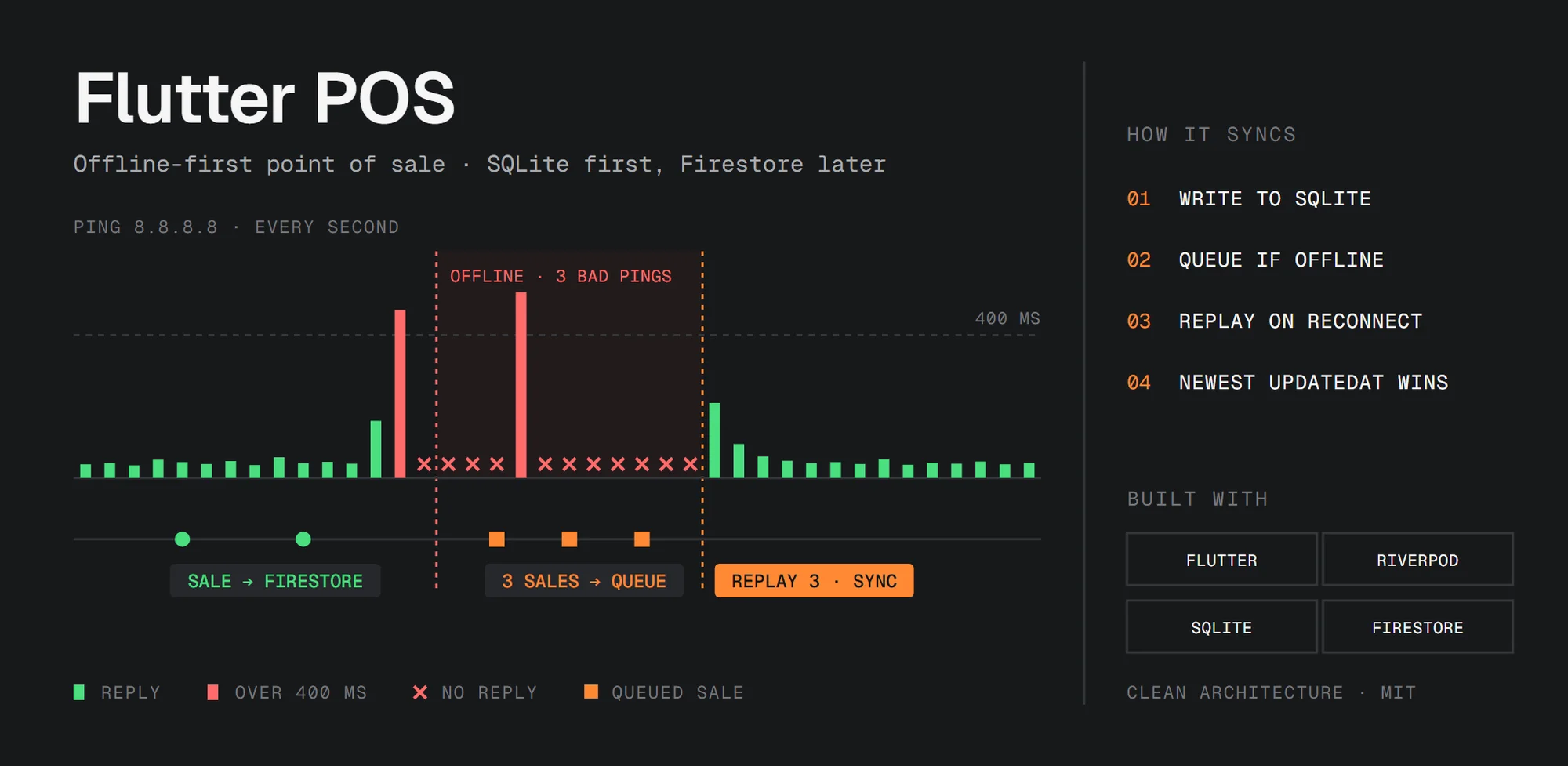
Flutter POS is an open source point of sale app built with Flutter. It keeps selling when the internet is gone: every sale is saved on the device first and sent to Firestore once the connection is back. It runs on Android, iOS, Windows, macOS and Linux, and it's structured with Clean Architecture, so it also works as a reference project.
- Source code: github.com/elrizwiraswara/flutter_pos
- Android APK: Flutter POS 3.1.0
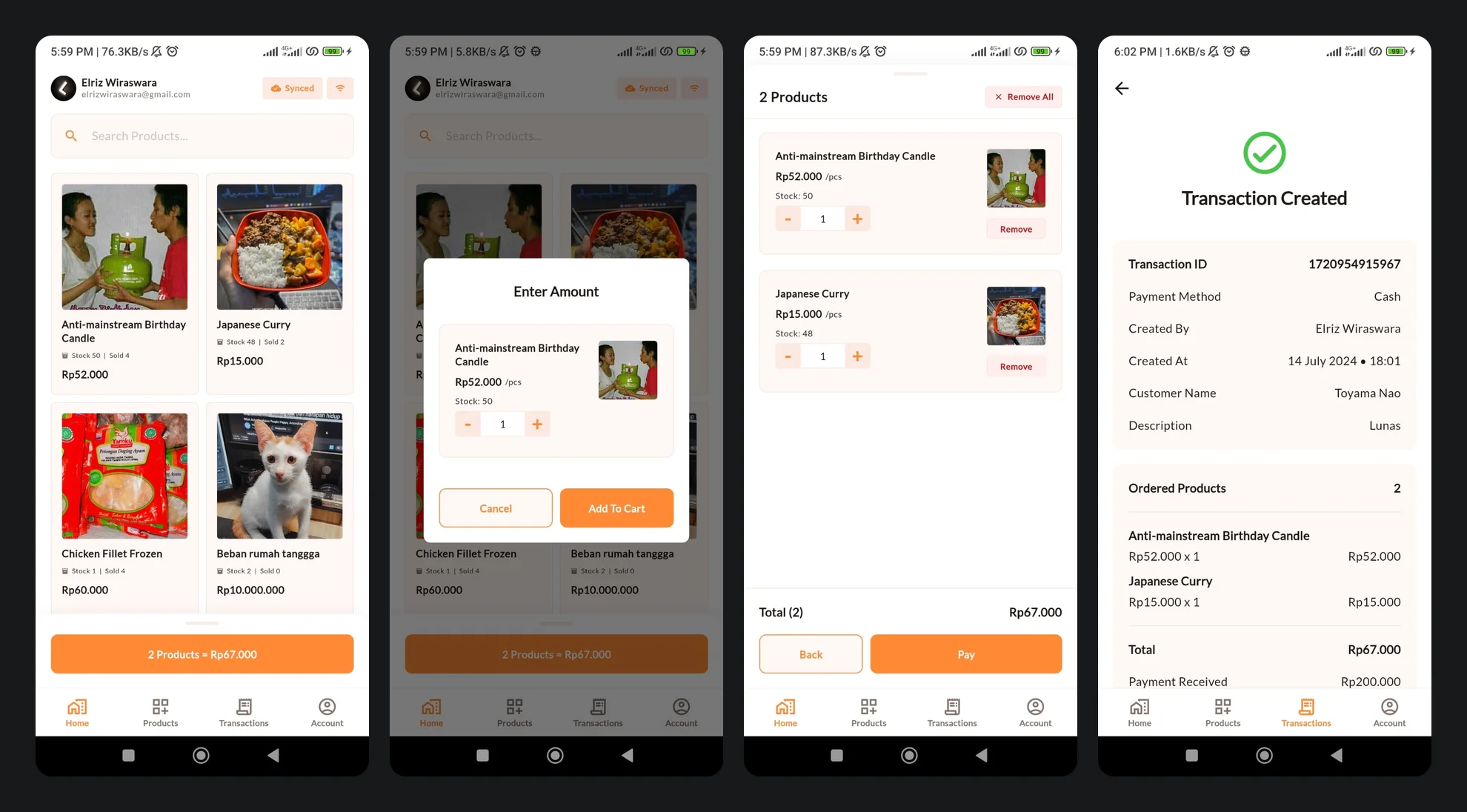
It started as a technical test
Flutter POS was originally a technical test, for one of the recruitment stages before I was hired remotely by a company based in Singapore. I ended up making it much more comprehensive than the test required, and the recruiter even pointed out that it went beyond what they expected.
After that, it felt like a shame to let the project go to waste. So in July 2024 I open-sourced it on GitHub, hoping it might be useful to someone someday, or serve as a reference for other developers.
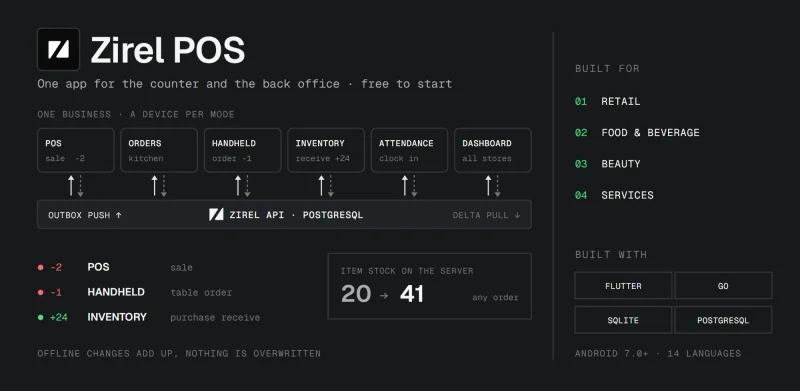
I didn't expect much. But the project got quite a bit of attention, and it now has over 200 stars and 90 forks, which makes it one of the most popular repositories on my GitHub. Some people use it as the starting point for their own POS apps. It's also the base of my own POS for real shops, Zirel POS.
Most questions I get about it are about the offline part. So this post starts with how offline-first apps are usually built, then shows which of those methods Flutter POS uses and how, and ends with the bugs other people found after I published it.
What offline-first means
Most apps are online-first. The server holds the real data, the app shows a copy, and when the connection drops you get a spinner or an error.
An offline-first app turns that around. The database on the device is the one the app reads and writes, and the server is a copy that gets updated when it can. The network becomes something that happens in the background, not something the app waits for.
For a POS, that's not a nice extra. A shop can't stop selling because the wifi went down, and a customer at the counter won't wait for a request to time out.
Common ways to build an offline-first app
There's no single recipe, but most offline-first apps are built from the same handful of pieces:
- A local database as the source of truth. The screens read and write a database on the device, like SQLite (through sqflite or Drift in Flutter), Isar or Hive. The network never blocks the UI.
- IDs created on the device. If the server hands out IDs, you can't create a record while offline. Offline-first apps use UUIDs or timestamps instead, so a record has its final ID from the start.
- A queue of pending changes, often called an outbox. Every change made offline is stored as an operation, like "create this sale", and the queue is replayed in order when the connection returns. Replaying operations is safer than copying values: "subtract 2 from the stock" still gives the right result if another device sold the same product in the meantime.
- Sync by timestamp. Each record keeps an
updatedAt, and the two copies are compared to see which one changed last. Larger apps also keep a "last synced" checkpoint and only fetch what changed since then, which is called delta sync. - A rule for conflicts. When both copies changed, one has to win. The usual choices are last write wins, server wins, merging field by field, or asking the user. Collaborative apps sometimes use CRDTs, data types designed to merge without conflicts.
- Tombstones for deletes. If a deleted record simply disappears, another device that still has it can't tell "deleted" from "not synced yet", and may upload it again. Marking it as deleted, and syncing that mark, solves this.
- A real connection check. Being connected to wifi doesn't mean the wifi has internet. Apps check by actually reaching something, like a ping or a small request to their own server, and often treat a very slow connection as no connection.
- Or a library that does it for you. Firestore has its own offline cache, and there are sync engines built for this, like PowerSync or Couchbase Lite. They save a lot of work, but you take on their data model and their rules for conflicts.
What Flutter POS uses
| Method | In Flutter POS |
|---|---|
| Local database as the source of truth | SQLite through sqflite (and sqflite_common_ffi on desktop) |
| IDs created on the device | The device clock in milliseconds, like 1720954915967 |
| Queue of pending changes | The QueuedAction table |
| Sync by timestamp | updatedAt on every record, compared when online |
| Conflict rule | Last write wins, with a 5-minute tolerance |
| Tombstones | Not yet (see below) |
| Real connection check | PingService, one ping a second |
| Firestore's offline cache | Cleared when the app starts, so SQLite is the only local copy |
Firestore could have handled part of this on its own. A local SQLite database gives the app full control instead: it can search and page through data with SQL, it works the same on every platform, and all the sync rules are in the code, where they can be read and tested.
Every write goes to SQLite first
The repositories decide where data goes. Adding a product, creating a sale or updating the profile all follow the same steps: write to SQLite, then either write to Firestore right away or, when offline, add a row to the queue.
final local = await productLocalDatasource.createProduct(data);
if (local.isFailure) return Result.failure(error: local.error!);

if (pingService.isConnected) {
  final remote = await productRemoteDatasource.createProduct(data);
  if (remote.isFailure) return Result.failure(error: remote.error!);
} else {
  final res = await queuedActionLocalDatasource.createQueuedAction(
    QueuedActionModel(
      repository: 'ProductRepositoryImpl',
      method: 'createProduct',
      param: jsonEncode(data.toJson()),
      // ...
    ),
  );
}
Reads start from SQLite too. When the app is online, a list also fetches the same page from Firestore and syncs the two before showing it. When it's offline, the app shows what SQLite has without waiting for anything.
A queued action is a note for later
This is the entity behind the queue:
class QueuedActionEntity extends Equatable {
  final int? id;
  final String repository;
  final String method;
  final String param;
  final bool isCritical;
  final String? createdAt;
}
So a queued action is basically a note saying "call this method on this repository with this JSON". For a sale it would be TransactionRepositoryImpl, createTransaction, and the whole transaction as a JSON string. It's pretty low-tech, but it has one big advantage: when something doesn't sync, you can open the SQLite file and read exactly what's waiting.
Queuing operations instead of values matters most for stock. When a queued sale is replayed, Firestore runs it in a transaction that reads the product's current stock and subtracts the quantity sold. If two devices sell the same product while offline, both sales are subtracted when they come back online, instead of one overwriting the other.
When the connection comes back
When PingService reports that the connection is back, the app syncs in this order:
- Replay the queue. Each action is turned back into a model and sent to the matching Firestore datasource. If it works, its row is deleted. If it fails, it stays for the next sync.
- Sync everything. The user, the products and the transactions are synced in both directions, in parallel.
- Report it. The app shows how many queued actions were sent, and checks whether any are still waiting.
The replay loop looks like this:
for (final queue in queues) {
  // Pass if the internet goes off in the process
  if (!pingService.isConnected) continue;

  final res = await executeQueuedAction(queue);
  result.add(res.isSuccess);
}
One thing to know if you fork it: a failed action doesn't stop the loop, so the next ones still run. Most of the time that's fine. But if your data depends on order, for example a sale that uses a product you created while offline, you may want to stop at the first failure instead.
Since October 2025, the app also blocks signing out while a sync is running, so a half-finished sync can't be cut off.
Two-way sync and conflicts
The two-way sync matches records by ID and compares their updatedAt:
| SQLite | Firestore | Result |
|---|---|---|
| Has it | Doesn't have it | Created in Firestore |
| Doesn't have it | Has it | Created in SQLite |
| Newer by more than 5 minutes | Older | Firestore is updated |
| Older | Newer by more than 5 minutes | SQLite is updated |
| Within 5 minutes of each other | Left as they are |
That's last write wins, with a tolerance for device clocks that don't quite agree. Products and transactions use 5 minutes, and the user profile uses 100:
final differenceInMinutes = updatedAtRemote.difference(updatedAtLocal).inMinutes;
final isDiffSignificant =
    differenceInMinutes.abs() > Constants.minSyncIntervalToleranceForCriticalInMinutes;

// Check which is newer based on the difference
final isRemoteNewer = isDiffSignificant && differenceInMinutes > 0;
final isLocalNewer = isDiffSignificant && differenceInMinutes < 0;
Checking the connection
PingService runs the system ping command against 8.8.8.8 once a second and keeps the recent latencies. If the last 3 pings all failed or took longer than 400 ms, the app treats itself as offline. So a connection that's technically there but too slow to be useful counts as offline too, which for a POS is the safer choice.
On emulators it pings 127.0.0.1 instead, because ICMP may not work on virtual devices. Whenever the status changes, the listeners are notified, and going back online starts the sync above.
What it doesn't handle yet
If you build on it, these are the gaps I'd look at first:
- Deletes. There are no tombstones yet. A delete removes the row, so if another device still has that product, its next sync sees a record that Firestore doesn't have and uploads it again. A
deletedAtcolumn that syncs like any other change would fix it. - Stock on other devices. A sale updates the stock and sold count without changing the product's
updatedAt, so the two-way sync doesn't see it as a change. Firestore ends up with the right numbers from the replayed sales, but another device keeps its own count until the product is edited. - Order of the queue, as mentioned above.
The architecture
Since this is meant to be a reference, the offline logic is kept in one place. The app follows Clean Architecture, with three layers:
- Domain: entities, repository interfaces and use cases. It knows nothing about SQLite or Firestore.
- Data: models, local datasources for SQLite, remote datasources for Firestore, and the repository implementations that decide between them.
- Presentation: Riverpod notifiers, screens and widgets, which only talk to use cases.
Everything in this post happens in the data layer. The screens don't know whether a sale went to Firestore or to the queue. Switching Firestore for another backend would mostly mean writing new remote datasources.
Bugs that came from issues
Most of the real problems in Flutter POS were found by other people, not by me.
In August 2024, a few weeks after I published it, someone reported that the ordered products in a transaction always showed 0. They kept digging and found it only happened on a second device. On the phone that made the sale everything looked fine. On another phone logged in to the same account, the same transaction showed up without its products. You never see this kind of bug if you test with one phone only. It's fixed, but if you change anything around transactions, test with two devices on the same account.
In July 2025 a few came in at once: a black screen on a Samsung A33 that turned out to be the database init, and a transaction screen that couldn't show more than 2 ordered items. Those went out in one update.
Many other issues were about setup, not code. If you want to run it yourself, these are the ones that keep coming up:
- Firebase Storage rules. Someone pointed out back in 2024 that the README didn't mention them. You need to set them, or uploads won't work.
- Firestore indexes. You only need three, and
idshould be an array index because it's used for the transaction list. I actually answered this wrong first in the issue and corrected it a few comments later. - Google Sign-In on Android. If you get a clientConfiguration error saying
serverClientIdmust be provided, that's the missing piece.
Printing took a while
For a long time, Flutter POS couldn't print receipts. In July 2025 someone asked for thermal printer support, and I said I'd add it in the next release. It wasn't in the next release. In February 2026 another person asked again, in all caps. I finally added it on March 2, 2026.
When I did, I put the printer code in its own package, unified_esc_pos_printer, and published it the same day. It talks to USB, Bluetooth classic, BLE and network printers with the same API. It's on version 3.4 now and gets around 2,700 downloads a month, which is a lot more than I expected for a printer package.
Riverpod
In March 2026 I moved the state management from Provider to Riverpod, in two pull requests. The first replaced the old dependency injection setup in lib/app/di. The second moved all the ChangeNotifier providers to Riverpod's Notifier, with immutable state classes. The app does the same things as before, but the state is easier to test now.
If you want to use it
The code is MIT licensed. There's an APK in the releases if you only want to try it. The datasources, repositories and use cases have unit tests, and there's a CLAUDE.md with the project conventions, so if you use an AI coding tool on it, the code it writes follows the same structure.
If you need a POS for an actual shop, not a codebase to learn from, that's what Zirel POS is for. And if you find a bug in Flutter POS, please open an issue. That's how most of the bugs above were found.