Godwit: CSV migration without sending your data to an AI
An open source tool that maps an old system's CSV export to a new system's import format from two samples, fully offline. Why I took the LLM out of it, and how it works now.
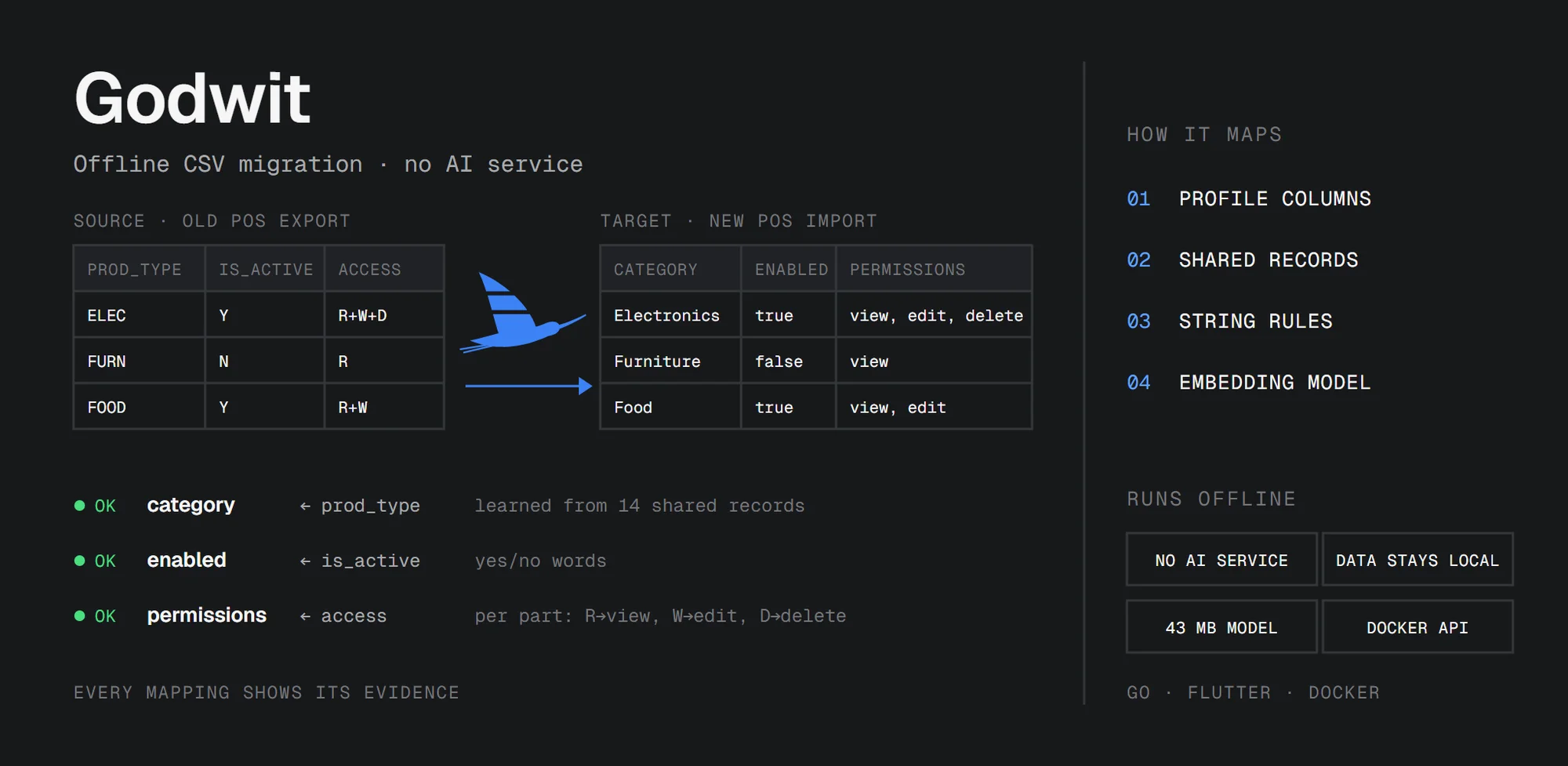
Moving a business from one app to another usually comes down to a CSV file. The old point of sale exports its products, the new one wants them imported, and the two never agree on a single column.
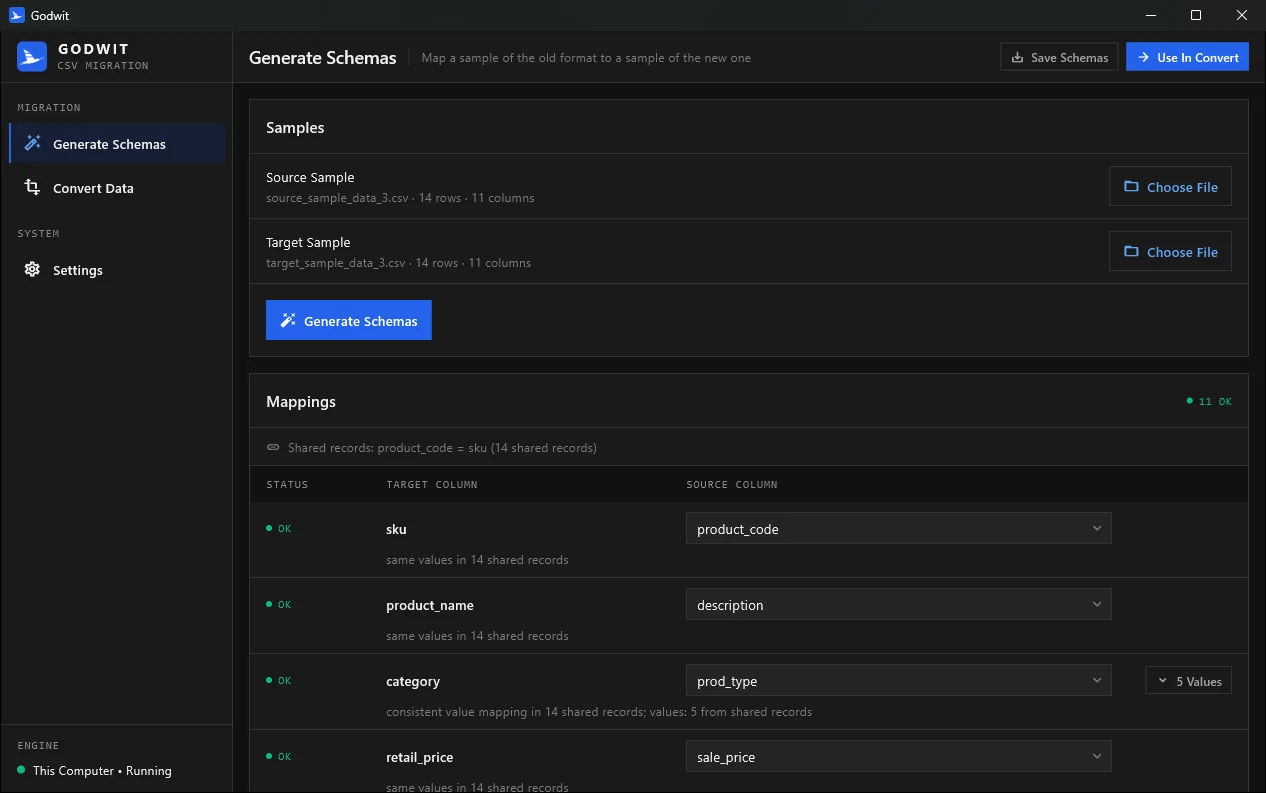
Godwit is my open source tool for that. You give it a small sample of the old format and of the new one, it works out how one maps to the other, you review the result, and it converts the full file. It runs on your own computer with no AI service, so the data never leaves it.
- Source code: github.com/elrizwiraswara/godwit
- Windows installer: Godwit 1.0.0
It didn't start that way. The first version asked a language model to do the mapping. This post is mostly about why I took the model out, and what replaced it.
The problem
Here's part of a typical export from an older POS:
| prod_type | is_active | availability_status | uom | access_rights |
|---|---|---|---|---|
| ELEC | Y | avail | pc | R+W+D |
| FURN | Y | disc | bx | R+W |
And here's what the new system wants for the same two products:
| category | enabled | stock_level | unit_of_measure | permissions |
|---|---|---|---|---|
| Electronics | true | in_stock | piece | view, edit, delete |
| Furniture | true | discontinued | box | view, edit |
Every column has a different name, and most values need translating. Codes become names, Y becomes true, and grouped values like R+W+D become view, edit, delete. With five columns, that's fine. With a 40-column product catalog and dozens of codes, it's days of careful, boring work, and it usually ends up as a one-off script that nobody else can check.
The first version used an LLM
From the start, the mapping was data, not code. A target schema lists the target columns and their allowed values. A source schema says which source column feeds each target column, and how each value translates:
{
  "column": "access_rights",
  "target_column": "permissions",
  "values": ["R", "R+W", "R+W+D"],
  "values_mapping": {
    "R": "view",
    "R+W": "view, edit",
    "R+W+D": "view, edit, delete"
  }
}
A small converter applies the schemas to any number of rows. Writing the schemas by hand was still the slow part, so I had a language model write them from the two samples, through Ollama.
I started with local models, for privacy. A 0.5B model on a normal laptop got column mappings wrong, missed values, and sometimes made up columns that weren't in the data. Mistral 7B was a lot better, but you need a strong machine to run it comfortably. The model that got everything right was gpt-oss 120B on Ollama's cloud, in 5 to 10 seconds.
But that means sending a business's products, customers or sales to someone else's server, which is exactly what a migration tool shouldn't do. So the choice was between a local model that wasn't good enough and a cloud model I didn't want to send data to.
Most of the job isn't AI
When I looked at what I was actually asking the model to do, most of it didn't need a model at all:
- Which columns hold fixed values, and what are they? Counting distinct values answers this exactly, and never misses one.
- Which source column feeds which target column? If both samples have some of the same records, lining them up answers it for certain.
- What does
ELECbecome? If every record withELEChasElectronicson the other side, the data already says so.
Only a small part needs some sense of meaning, like knowing that vendor_company and supplier_name are the same thing. So Godwit now does the job in four steps, and each step uses the lightest thing that does it reliably.
How Godwit maps, in four steps
1. Column profiling. For each column, Godwit works out its data type (number, date, email, yes/no or text), whether it holds a fixed set of values or free data, and the exact list of values. It also recognizes pairs like store_id and store_name, which point to another record rather than being a category.
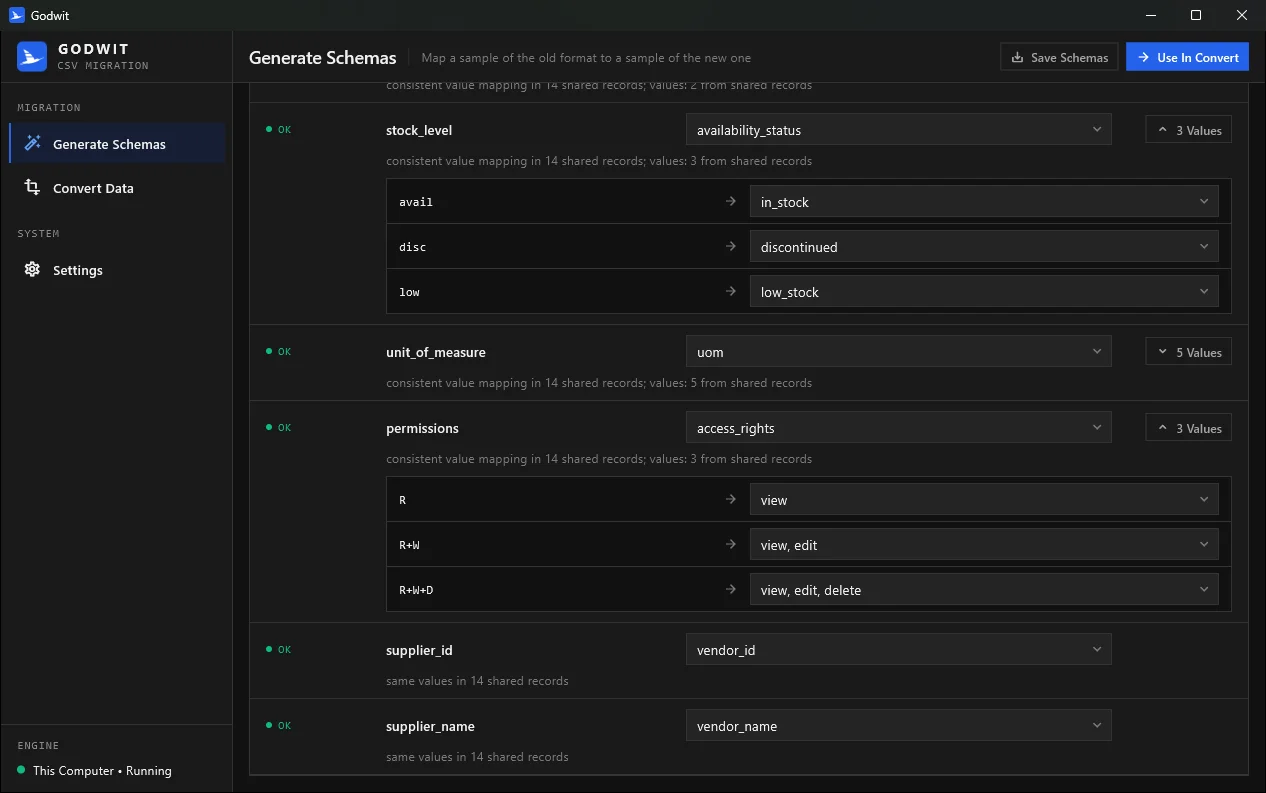
2. Learning from shared records. If the samples share a key, for example product_code = sku, Godwit lines the rows up and reads each mapping straight from the data. Grouped values are learned per part (R → view, W → edit, D → delete), so combinations that aren't in the sample, like R+D, still convert. To avoid lining up unrelated records that just happen to use the same IDs, another column has to agree as well.
3. String rules. Whatever the records don't settle is matched by rules. Column names are compared word by word, with common abbreviations spelled out (qty, uom, desc). Values are matched by exact match, yes/no words, prefixes (ELEC → Electronics), initials (F&B → Food & Beverage) and abbreviations (btl → bottle). When a rule matches more than one candidate, it gives no answer instead of guessing.
4. A small embedding model. For column names that share no words, Godwit compares meaning with all-MiniLM-L6-v2, a sentence-embedding model with 22 million parameters. It's not a chat model. All it can do is turn text into numbers, so text hidden in a CSV file can't tell it to do anything. A match from this step only counts when it's clearly ahead of the next best one.
Every mapping keeps the evidence it came from. Mappings that depend on the embedding model, or on being the only value left, are marked Check, and values with no mapping are listed as Unresolved. So when you review, you know exactly where to look.
How well it works
I tested it on the four pairs of sample files in the repo, and on two more pairs with other kinds of data (customers and orders) that weren't used while writing the rules:
| Test | Columns | Values |
|---|---|---|
| Repo samples, with shared records | 44 / 44 | 51 / 51 |
| Repo samples, no shared records, rules only | 41 / 44, 1 wrong | 46 / 51, none wrong |
| Repo samples, no shared records, rules and model | 44 / 44 | 51 / 51 |
| Other data, with shared records | 22 / 22 | 35 / 35 |
| Other data, no shared records | 22 / 22 | 35 / 35, 3 marked Check |
The second and third rows show what the embedding model is for. Without shared records, the rules alone leave two columns unmatched and get one wrong. With the model added, all of them are right.
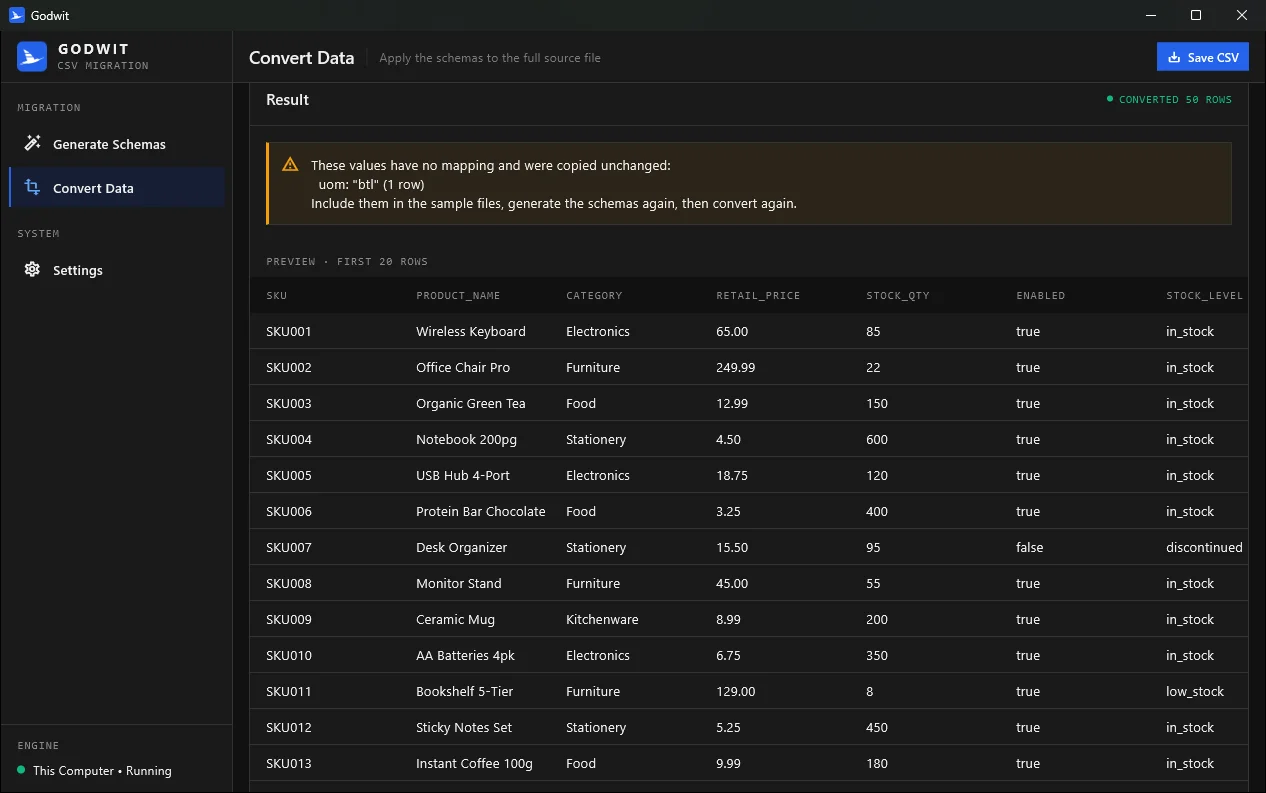
The result I like most: on one of the samples, Godwit found a mapping that the 120B cloud model had missed. A low-stock status coded L was left unconverted in three rows of the old output. Conversions now also list every value that was copied unchanged, so a status or unit that's missing from the sample can't slip through quietly.
To be fair, these test files are small and clean, and real exports are messier. That's what the review step is for.
The app
The desktop app is built around that review step:
- Choose a sample of the old format and of the new one, and generate the mappings.
- Each target column shows its status, its source column and the evidence. If the source column is wrong, pick another one from the dropdown, and Godwit maps that column's values again.
- Fix any value mapping from a dropdown, then convert the full file, preview it and save it.
The layout works in narrow windows too. On small screens, the navigation becomes a drawer and each mapping stacks its parts.
On your computer, or on your server
Godwit comes in three forms, all using the same engine:
- Desktop app (Windows). The installer includes the app, the engine and the model. The app starts the engine itself, listening only on
127.0.0.1with a new random key every session, so other programs on the computer can't use it, and stops it when the app closes. Nothing needs an internet connection. - API server (Docker). The same engine as an HTTP API that your other apps can call. The image is about 53 MB and contains only the server and the model, and it runs as a non-root user on a read-only file system. It won't start without API keys unless it only listens on localhost, and it never stores or logs the uploaded data.
- Command-line tools.
generatorandconverter, for scripts.
Running the server is one command, with a key for each app that will call it:
GODWIT_API_KEYS=key-for-app-1,key-for-app-2 docker compose up -d --build
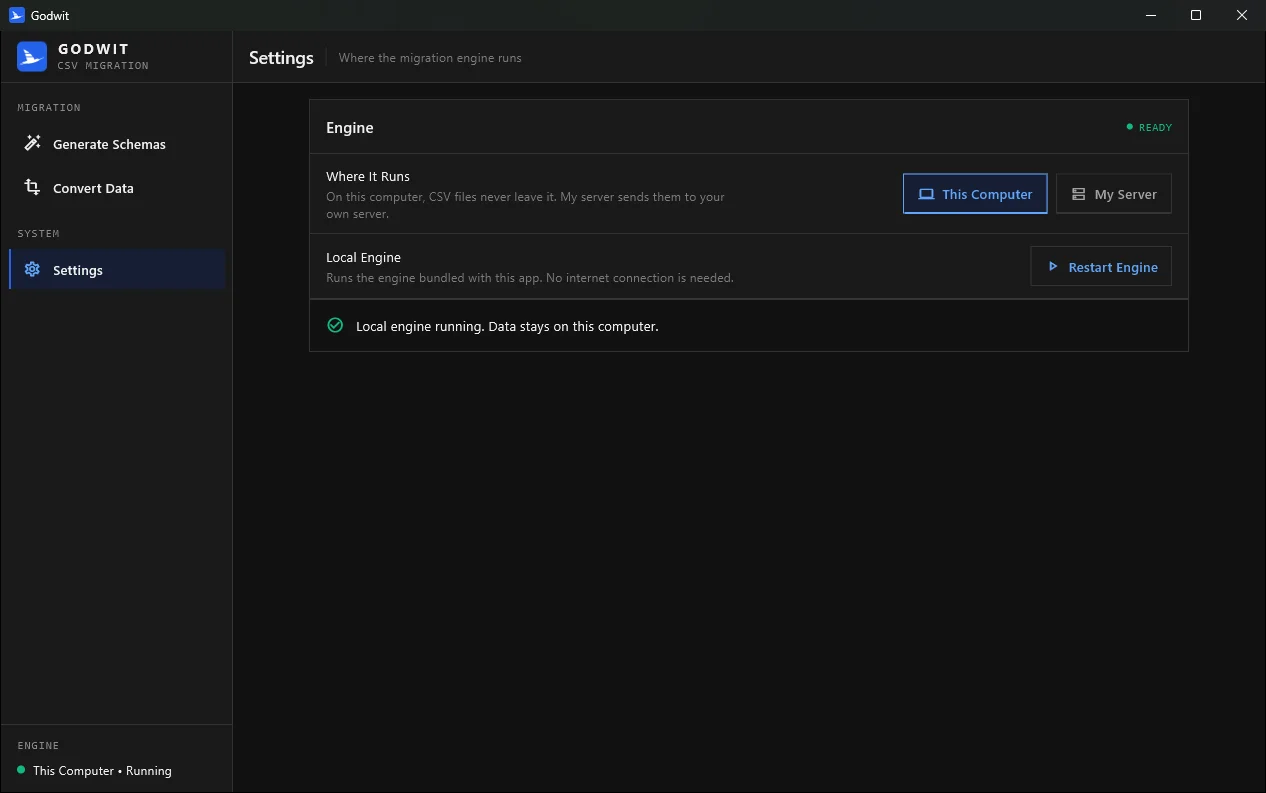
The desktop app can then use it from Settings → My Server, over HTTPS.
Under the hood
- A Go engine with no third-party dependencies. The embedding model runs in pure Go: the WordPiece tokenizer and the six-layer transformer are written directly, with no CGo or native libraries. Its output matches the official ONNX version of the model to a cosine similarity of 0.9999995 on the test sentences.
- The model is stored as safetensors, a plain data format that can't run code when it's loaded, converted to half precision. That's 43 MB, half the original size, and small enough to keep in the repository.
- A Flutter desktop app with a flat, dark interface and a responsive layout.
- Tests cover the API, the mappings for every sample pair, the embedding output, phone-sized layouts, and a Windows UI test that drives the real app with the real engine.
Limitations
- Samples matter. Godwit can only map values that appear in the samples. Include every value of each status or category column, and some of the same records in both samples if you can.
- English names. The embedding model only knows English. For other languages, the first three steps still help.
- No business logic. Rules like "pending for more than 30 days becomes overdue" belong in your own code, after the conversion.
- Windows first. The installer is Windows-only for now, and it isn't code-signed yet, so SmartScreen shows a warning the first time you run it.
Try it
- Download the Windows installer from the 1.0.0 release.
- Read the README for the schema format, the API and building from source.
- Issues and pull requests are welcome on GitHub.