Money Chat AI: a finance chat where the AI only writes commands
My open source finance tracker that you just chat with. How a habit of recording receipts led to it, why the model only replies with slash commands, and how that idea turned out to be close to MCP.
Money Chat AI is a personal finance tracker that you just chat with. You type something like "please add expense burger 10000", send a photo of a receipt, or ask for a recap of the month, and it records it. It's a Flutter web app on Firebase, and the AI part runs on gpt-4o-mini through a Cloud Function.
- Source code: github.com/elrizwiraswara/money_chat_ai
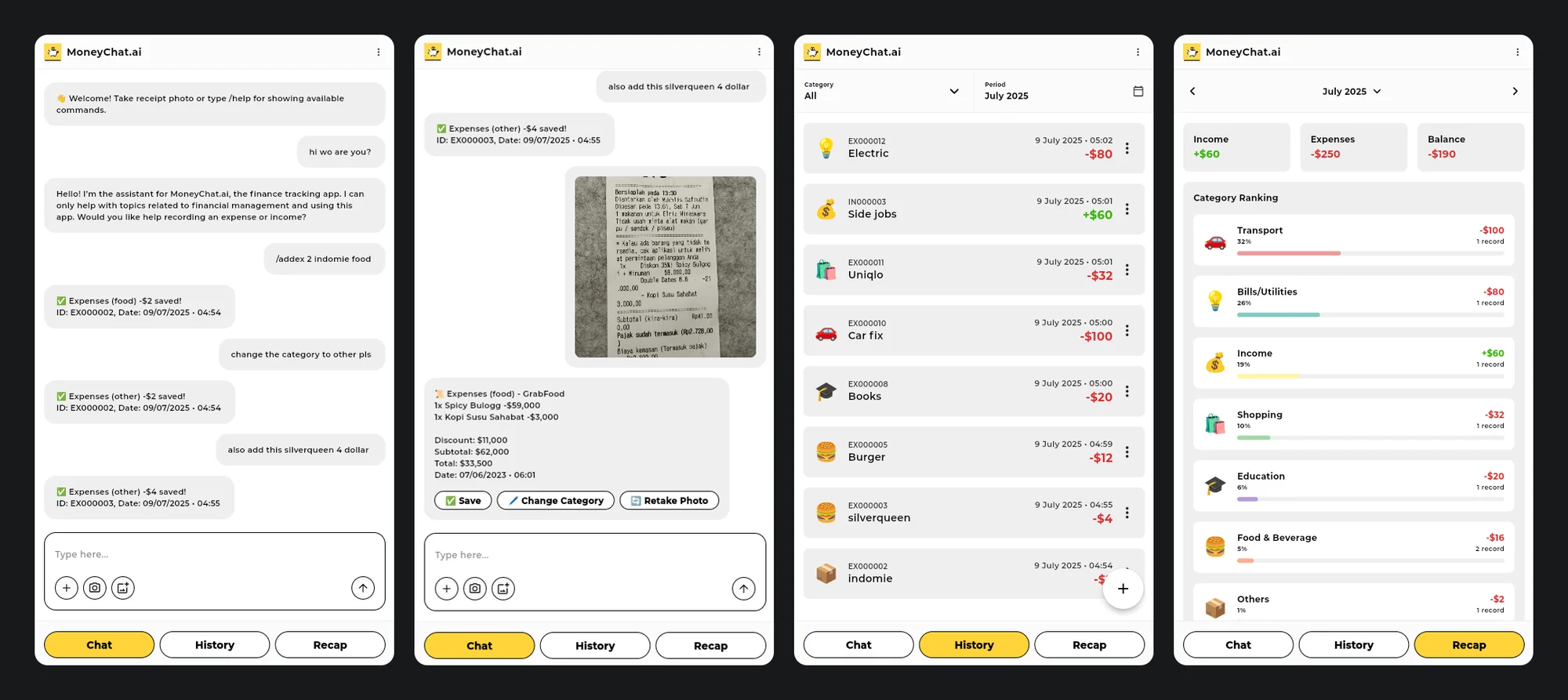
The chat isn't the interesting part. The interesting part is how the AI is connected to your data, which is that it isn't. The model can only reply with text, and the app decides what that text is allowed to do. This post is about how I ended up there, and how it works.
It started with receipts
I have a habit of recording all my expenses and income every month. Over time, typing in every item from every receipt became tedious, especially once receipts started to fade. Most of them are printed on thermal paper, and after a while some lines are barely readable.
I tried several receipt-scanning apps, but none of them really satisfied me, and the ones powered by AI were usually paid. So I decided to build my own.
Small models, long prompts
I also wanted to see how well AI could handle a repetitive task like this. My first attempts asked the model to do everything at once: understand what I meant, remember my categories, get the numbers right and decide what to save.
That's where I ran into limited context and inconsistent responses, especially with smaller open source models. A prompt full of rules and categories leaves little room for the conversation itself, and the same request could come back in a different shape each time. For a finance tracker, that's a real problem, because a wrong number goes straight into the records.
So I tried the opposite: a command-line approach, with exact commands parsed by plain code. That was reliable, but having to type commands by hand was still inconvenient, and avoiding manual typing was the whole point.
Why not both?
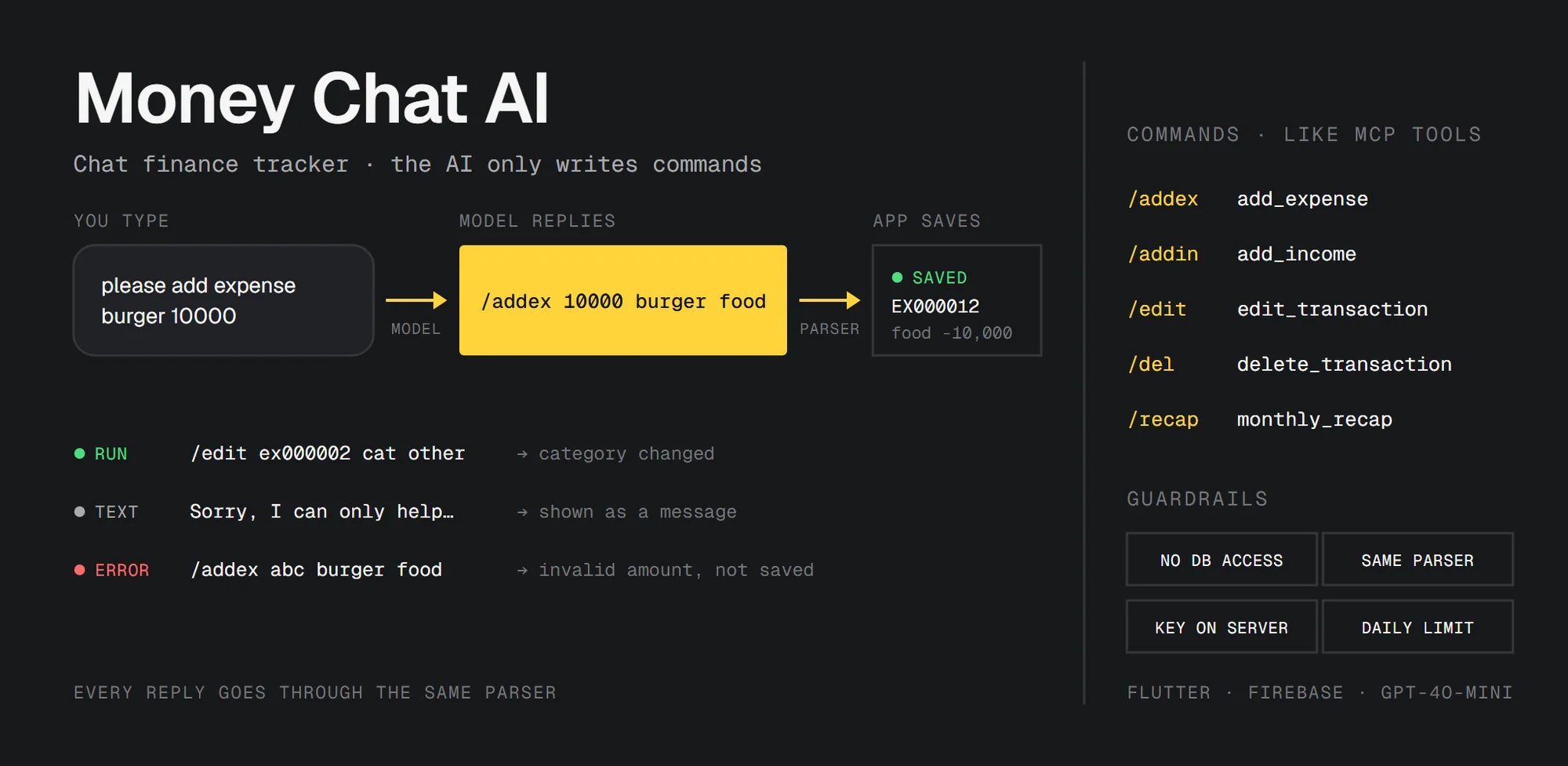
Then I had an idea: combine the two. You talk to the app in natural language, and the AI's only job is to turn what you said into one of the predefined commands. The app runs the command, not the AI. On top of that, receipts are read automatically, so there's nothing to type at all.
It took several rounds of trial and error, but in the end it worked as I wanted. Requests come in as normal sentences, and every action goes through the same predefined commands, so the results stay consistent. And because the model only has one small, well-defined job, it doesn't have to be an expensive model. gpt-4o-mini is enough, and the model name is just a setting.
Slash commands
The app has a few slash commands that you can type yourself:
/addex 10000 burger food
/addin 150000 freelance
/edit ex000001 amount 30000
/del ex000001
/recap 01 2025
/help
When you type a command directly, the app parses it and runs it. No AI is involved, and there's no API call.
When you type a normal sentence, the app sends it to the model together with a system prompt. The prompt lists all the commands with their arguments, the categories you have, and examples like this:
- User: "please add expense burger 10000"
  GPT: /addex 10000 burger food
So the model's main job is translation, from your sentence into one command. The app then takes the model's reply and runs it through the same parser it uses for the commands you type:
final result = CommandParser.parseCommand(res.content ?? '');

if (result.isValid && !result.noCommand) {
  return _handleCommand(result);
}
That means a reply can only end in one of three ways:
- A valid command runs, exactly as if you had typed it.
- Plain text, like a money tip, an explanation of a feature or a polite refusal for anything off topic, is shown as a chat message.
- A broken command is shown together with the parser's error, and nothing is saved.
The model never writes to Firestore, and it never gets a function that can.
The conversation so far is sent along with each message, so the model can follow up on earlier ones. In the first screenshot, "change the category to other pls" becomes an /edit command for EX000002, because that ID is in the "saved" message just above it.
The parser
For /addex, the parser checks that there are at least four parts and that the amount is a number, then takes the last word as the category ID. Everything in between is the description.
final amount = double.tryParse(parts[1]);
if (amount == null) {
  return CommandResult(
    type: CommandType.invalid,
    error: '❌ Invalid amount: ${parts[1]}',
  );
}

final description = parts.sublist(2, parts.length - 1).join(' ');
final categoryId = parts.last;
The other commands are just as strict. /edit only accepts four fields (amount, desc, cat and date), and /recap only accepts a month from 1 to 12 and a year from 1900 to 2100. Before /edit or /del changes anything, the app also checks that the transaction exists, and a new category set through /edit has to exist too.
It's very simple code. The model can still misunderstand you, for example take the wrong number from a long sentence. But whatever it produces has to pass the same checks as a command you typed by hand. The worst case is a bad command and an error message, not a model doing something with your data that no command allows.
This matters even more for receipts. The text from a receipt photo goes into the prompt, and a receipt is text written by someone else. Keeping the model limited to "suggest a command" means there's not much a strange receipt can make it do.
Receipts take two calls
Reading receipts was the reason I started, and it's split into two requests.
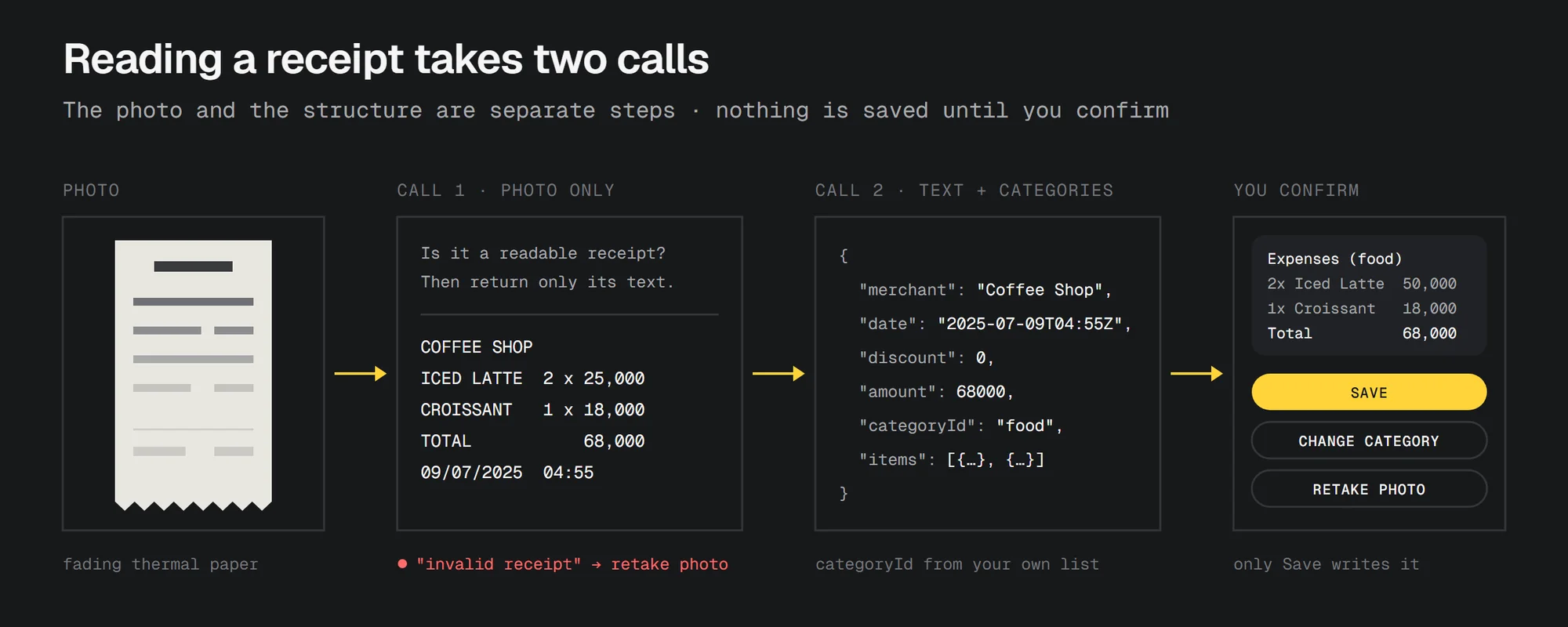
The first request only gets the photo. The prompt asks the model to decide whether it's actually a receipt, and if it isn't, or it's too blurry to read, to answer with exactly invalid receipt. Then the app asks you to retake the photo. If the receipt is readable, the model returns only the raw text.
The second request gets that text plus your category list, and has to return JSON in a fixed shape: merchant, date, discount, amount, categoryId, and the items with their name, quantity and price.
I split it like this so a bad photo fails early, with a clear message. When one prompt does everything at once and something goes wrong, you get JSON that looks right but has a total from nowhere, and it's hard to tell whether the model misread the photo or misunderstood the text. With two calls, each step can be checked on its own. Long-pressing the app name turns on a debug mode that shows the raw text from the first call and the JSON from the second under each message.
Even then, nothing is saved yet. The result appears as a message listing the merchant, the items, the discount and the total, with three buttons: Save, Change Category and Retake Photo. Only Save writes the transaction.
The Cloud Function
All requests go through one Cloud Function, so the OpenAI key stays on the server and never reaches the web app. The function also counts how many requests each user has made today. The limit is a number in Firestore, userMaxRequests in the config/gpt document, and the counter resets when the date changes:
const currentDailyRequests = lastRequestDate === todayDateString ? dailyRequestCount : 0;
The prompts live in Firestore too, in the config collection, together with the model name and the maximum number of tokens per reply. The app loads them from there, so when a prompt needs fixing, I edit a document instead of deploying a new version. Sample versions of all three prompts are in the repo under prompts/.
Then I found out about MCP
Once it worked, I came across MCP, the Model Context Protocol, which Anthropic had introduced not long before. The idea was very close to what I had built: an app exposes tools with defined inputs, the AI decides which one to call, and the app still decides what's allowed.
I felt excited and disappointed at the same time. Excited, because I had arrived at a fairly new idea on my own, starting from a real problem. Disappointed, because someone else had already thought of it, and given it a name.
To be clear, Money Chat AI doesn't use MCP. But the slash commands are basically MCP tools, written as plain text:
| Command | As an MCP tool |
|---|---|
/addex |
add_expense(amount, description, category) |
/addin |
add_income(amount, description) |
/edit |
edit_transaction(id, field, value) |
/del |
delete_transaction(id) |
/recap |
monthly_recap(month, year) |
The main difference is the format. MCP tools take typed JSON arguments, and any MCP client can discover and call them. My commands are plain text that only my app understands. Plain text does have one advantage: any model that can follow a few examples can write it, including small models without reliable tool calling.
If I add an MCP server to it someday, the commands map almost one to one, and the checks that the parser does now would run on the server. Then the chat inside the app wouldn't be the only way in. Any assistant that supports MCP could add an expense or ask for a recap.
Open source
In the end, I open-sourced the project on GitHub under the MIT license. I hope it can serve as a reference for developers exploring how to connect AI to an app with the MCP idea, especially with small, cheap models. The README explains the Firebase setup, the config collection and the Firestore indexes it needs.
Limitations
- The model can still get things wrong. It can take the wrong number from a long sentence or pick the wrong category for a receipt. The parser stops broken commands, not wrong ones, so check the "saved" message.
/editand Change Category fix the rest. - The whole chat goes with every message. That's what makes follow-ups work, but long chats use more tokens. Clear Chat in the menu starts fresh.
- Web only. The project is set up as a Flutter web app.