Notes from building Nyao Scalper
How my open source MT5 scalping EA decides to trade, what changed since February, and what to know about the hedge chain before running it.
Nyao Scalper is an experimental open source project, made for learning. Trading forex and CFDs is risky and backtest results say nothing about the future. Nothing in this post is financial advice.
I started Nyao Scalper in February 2026. It's an expert advisor (EA) for MetaTrader 5 that scalps on M1, written in MQL5. Two weeks after the first commit the version number in the code was already v36, and now it's v43. The logic changed a lot in a short time.
This post is a few notes on how it decides to trade and the main things I had to change. The README has every setting if you want the full detail.
How it decides to enter
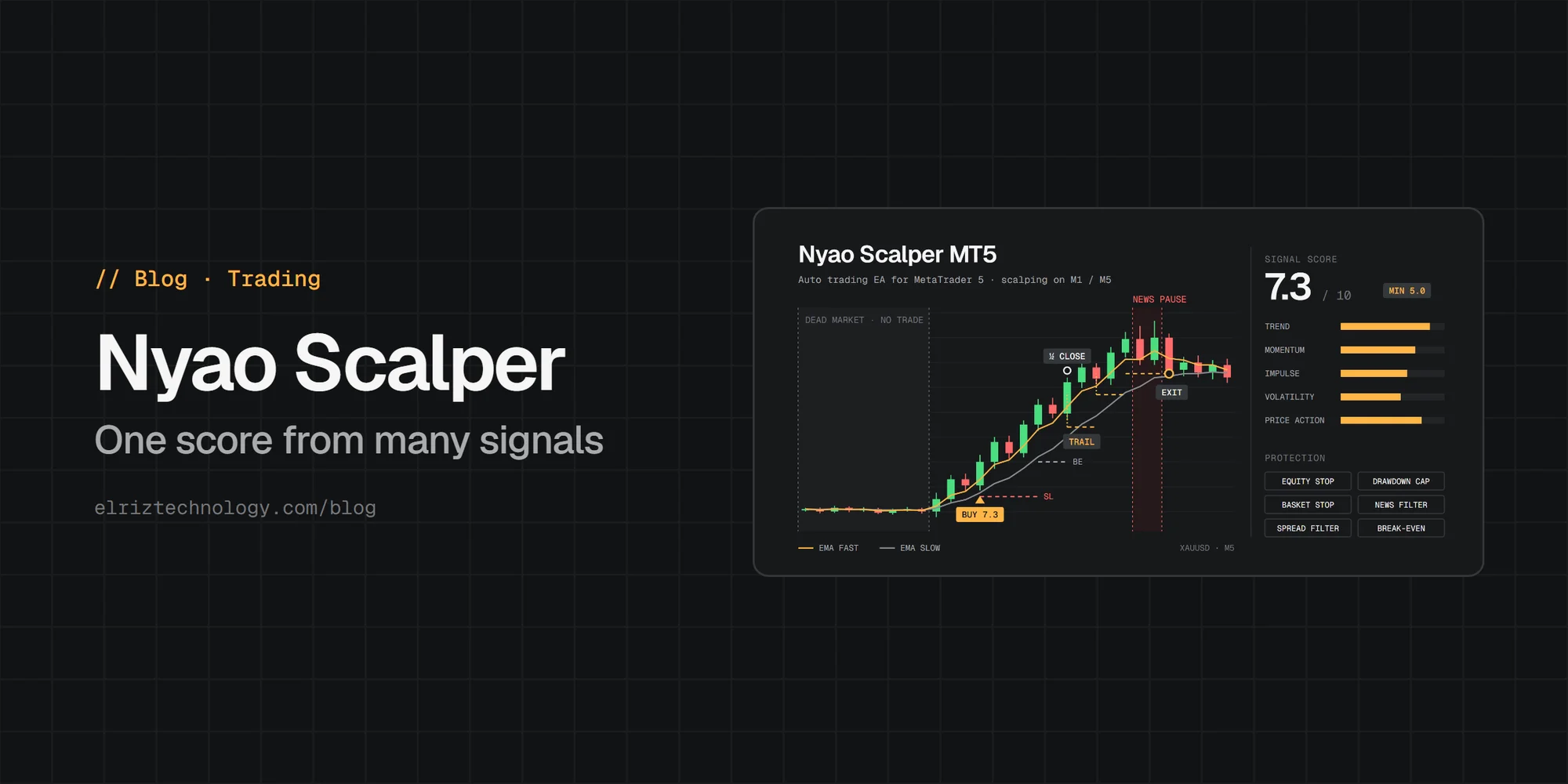
Nyao doesn't trade on one indicator. It calculates a score from 0 to 10 from a few parts:
- Trend. Are the fast and slow EMA aligned, and is the fast one actually sloping. The slope is measured over a few bars so M1 noise doesn't flip it every minute.
- Momentum. RSI inside a trending range, RSI breaking key levels, candle bodies bigger than usual.
- Impulse. Is price accelerating, are the candles continuing in the same direction.
- Volatility. ATR compared to its own average.
- Price action. Breakouts from recent highs or lows add points, long wicks against the direction take points away.
A trade only opens when the total passes MinSignalScore, which is 4.5 in the default profile. Every weight is an input, so you can see which part of the score did what and change it.
Entries on every tick were a mistake
The first versions checked for entries on every tick, while the current candle was still forming. Inside one bar a signal could show up, open a trade, and then disappear before the candle closed. On the chart afterwards there was nothing that explained the trade.
Now there's EnableNewBarEntryOnly, on by default. Entries are only decided when a bar closes, and open positions are still managed every tick. Backtests got less exciting after this, but they're closer to what happens live.
Free points in a dead market
The chop and volatility parts of the score used to give some points even when the market was very quiet. So in a slow session the EA could still reach the threshold and open trades where the move was too small to even pay the spread.
Two changes fixed it. The low tiers of those parts now give 0, and I lowered the thresholds by about 1.0 in all profiles to balance it. And if ATR falls below MinVolRatioToTrade times its average, the whole score is forced to 0, so no trade at all.
Buying the top
This one came up in late February. After a few strong candles in the same direction the score is at its highest, which is exactly when the move is almost done. The EA kept opening more positions there.
The fix is ConsecutiveCandleThresholdBoost. For every candle in a row that opened a position in the same direction, the minimum score for the next entry goes up, up to MaxConsecutiveCandleBoosts times. It resets once a candle passes without a new position in that direction. At the same time the old hardcoded limit of one trade per candle became a setting, MaxTradesPerCandle.
Costs and smaller fixes
On M1 gold, spread and commission are the biggest cost. There's a max spread filter that blocks new entries when the spread is too wide, either a fixed number of points or a ratio of ATR. If your backtest uses zero spread, the results don't mean much.
Some fixes were smaller. In March I fixed an unsupported filling mode error on XAUUSD. And in v41 the stop loss unit was different per profile, so the numbers didn't really match what each profile was supposed to be. Now every profile uses percent of equity.
The hedge chain
In June 2026 I added an optional hedge chain recovery. I want to be clear about it: it's a martingale. When a position goes into loss by HedgeTriggerATR × ATR, the EA opens a reversed hedge, and the lot size grows as the chain rolls. It can recover a lot of drawdowns, but it turns many small losses into fewer big ones, and it has real ruin risk in a strong trend.
Things you should know before running it:
- It's on in four of the five profiles, including default. Only the safe profile has it off. If you don't want it, set
EnableHedgeChainto false. - It's limited by cycles, levels and a max lot. When the chain can't grow anymore, the positions are handed back to the normal loss management, not closed.
- The hard loss cap for the chain,
HedgeMaxChainLossPct, is 0 (off) in every profile. If you turn the chain on, think about setting it. - While a chain is active, its positions are excluded from the basket stop.
One improvement from early June: a quick spike that crosses the trigger inside a candle used to open a doubled hedge right away. Now the chain only starts if the score in the opposite direction is at least HedgeMinSignalScore. If it was just a wick, there's no strong opposite signal and no hedge.
Other protection
Besides the hedge chain there's a minimum equity stop, a max drawdown stop, an optional daily target, a news filter that pauses before and after high impact news, trading hours, and a basket stop that closes everything when total floating loss passes a percentage of equity.
If you backtest it
The README has a section about this, but the short list:
- Use "Every tick based on real ticks".
- Put in your broker's real commission and spread.
- Tune on one period and check on another period you didn't touch.
- The news filter doesn't work inside the Strategy Tester because it can't read the economic calendar there, so drawdowns around news in a backtest are better than reality.
For account size, the README suggests safe-aggressive for $100 to 200, and default or balanced from around $500.
Nyao is free and BSD-3 licensed. It has around 190 stars and 80 forks now. I don't sell it anywhere, so if you see someone selling it under my name, that's a scam. Bugs and ideas go to the issues.